
HomeShowcaseB Roll Science Explainer Chameleon Color
Showcase · Case studyPowered by B-Roll Science Explainer

Enter a topic and auto-generate a narrated science short

Starting from the topic "How do chameleons change color?", the Skill automatically handled content research, wrote the voiceover script, and generated TTS narration. It then planned 7 animated info cards, overlaid and rendered them, and burned in subtitles to produce a 67-second landscape science video. Along the way, the user only needed to approve the script and card plan—everything else was handled by the Skill.

13
rounds of dialogue
2
images generated
4
distinct directions
FINAL
ROUND 13
delivered by ribbi
1920 × 1080 · landscape
The full creative process

13 rounds, 5 visible turning points.

01/ 05
05-14 03:40

Choosing the topic: from plants to lizards

U
User brief
Do you have any plant-related topics? ... What about one on lizards?
R
What Ribbi did
The Skill proactively suggested a list of possible topics by direction, helping the user quickly pivot from plants to lizards and narrow it down to the most visually compelling idea: "how chameleons change color."
02/ 05
05-14 03:42

Length confirmed and script generated

U
User brief
Chameleon color change, make it 60 seconds
R
What Ribbi did
The user changed the length from 2 minutes to 60 seconds, and the Skill instantly compressed the voiceover script to about 195 Chinese characters while preserving a three-part structure: "counterintuitive hook → mechanism explained → closing insight," then waited for approval.
03/ 05
05-14 03:48

TTS voiceover audio generated

U
User brief
Looks good
R
What Ribbi did
With that one-line approval, the Skill automatically generated a 67-second Chinese science voiceover and simultaneously produced a timestamped subtitle file, creating the foundation for layering visual info cards next.
变色龙变色科普旁白音频
0:00
1:07
04/ 05
05-14 03:57

Planning and previewing visual info cards
U
User brief
Let me see what you can add... mixed Chinese and English like "a few hundred nm" looks weird, and add an opening card
R
What Ribbi did
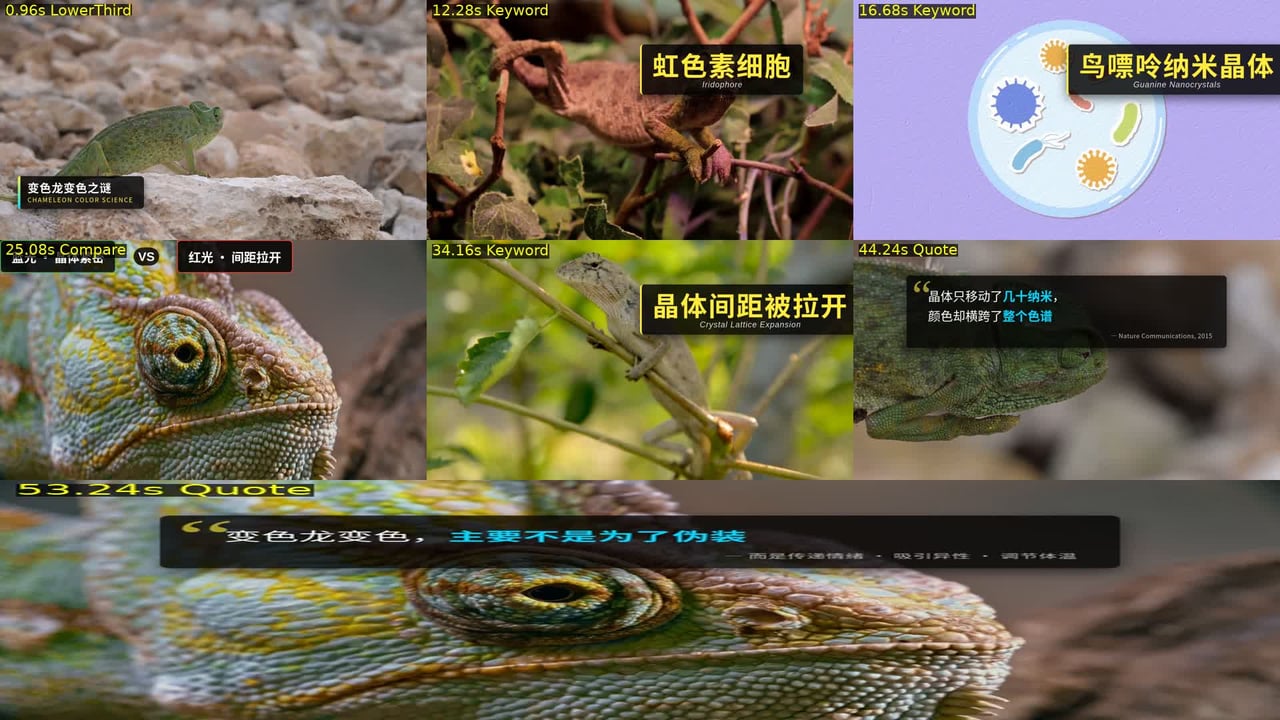
The Skill read the subtitle timeline and planned 7 info-card cue points (LowerThird intro, Keyword, Compare, Quote). It replaced Chinese number phrasing that didn't visualize well with concept cards, then captured key frames, overlaid the renders, and assembled a 3x3 preview grid so the user could check placement and copy.
7 个信息卡片叠帧九宫格预览
05/ 05
Approved
05-14 04:04

Final rendering and video compositing

U
User brief
Render it
R
What Ribbi did
After the plan was approved, the Skill rendered 7 animated cards in parallel, layered them onto the video one by one with ffmpeg, burned in subtitles, and exported the final piece: a 67-second landscape science video with information pacing synchronized to the narration.
Why it works

5 reasons every round lands.

01 · Just give a topic, and AI handles the research

The user only needs to provide a keyword. The Skill then retrieves core scientific knowledge from multiple sources at once and distills it into visualizable concepts, with no need for the user to prepare materials or copy.

02 · Script structure comes with built-in hooks and pacing

The voiceover script is automatically organized into a three-part structure: "counterintuitive hook → mechanism explained → closing insight," with a natural spoken tone that adapts to formats from 60 seconds to 5 minutes.

03 · TTS voiceover automatically matches the content style

Based on the content style, the Skill automatically chooses voice and speaking speed between a documentary tone and a science-creator tone. Chinese and English each get matching voices, with no manual selection needed.

04 · Subtitles are generated in sync and support iterative review

Once TTS is finished, the Skill outputs a timestamped subtitle file at the same time. It can also proofread typos and clean up punctuation so the subtitles stay perfectly aligned with the narration.

05 · Info cards are customized to the content and overlaid automatically

For key concepts and data points in the script, the Skill plans dynamic cards such as Keyword, Compare, and LowerThird. After frame-based preview confirmation, it overlays them onto the video with ffmpeg and burns in subtitles, so the on-screen information density stays in sync with the narration pace.

Ribbi Skill

Try B-Roll Science Explainer

Creators use it every day. Start from your brief and ship a finished work in minutes — no Photoshop, no designer required.

Try now